


Source Defense OPTIMJACK Findings Reinforce the Need for Website-Wide Protection

Source Defense researchers analyzed seven distinct malicious JavaScript samples linked to the November 16, 2026 Optimizely attack. Public research connected compromised Optimizely snippets to 178 organizations. The samples reveal how the campaign combined cryptocurrency theft, payment-card skimming, cookie and screenshot collection, and payloads targeting iOS devices.
The attacker inserted code into Optimizely Web Experimentation customer projects. Because affected sites trusted the Optimizely script, browsers ran the compromised code as part of that approved source. The code appeared across affected sites, including pages before payment, although Source Defense confirmed its execution on payment pages.
Attack details
Each of the seven samples had a different SHA-256 fingerprint. All contained cryptocurrency-address replacement and an iOS payload loader. Four contained code for payment-card skimming, six for screenshot and cookie collection, and three had a branch targeting Hootsuite cookies.
The samples also differed in how they worked. Some expanded address replacement beyond page text and form fields to URLs and other page elements. Later versions intercepted more browser actions, including network requests, navigation, and sharing, and added another iOS delivery route.
Researchers found malicious code in both a separately loaded script and a file served through Optimizely. One Optimizely-served sample included an embedded copy of the payload. If the separate script failed to load or remained incomplete for about 2.5 seconds, the file attempted to run that copy. Blocking the attacker’s domain alone might not stop the fallback if the site’s policy allowed it to execute.
The code’s capabilities do not prove that every behavior occurred in every visitor session. Source Defense distinguishes exposure to the code from its delivery, execution, access to data, and confirmed data theft. Confirming theft requires evidence that sensitive information was sent to an attacker-controlled destination. An iOS payload loader alone does not establish that a device was compromised.
How Source Defense protects you
Source Defense provides visibility and runtime controls inside the browser, where scripts interact with website data and page content. The platform can block malicious scripts, isolate code, and redact sensitive fields.
With more than a decade focused on client-side security, Source Defense brings specialized threat knowledge to the controls it applies to scripts. If malicious code runs inline within an Optimizely script, Source Defense can allow the script to run while redacting sensitive fields it is not authorized to access.
The risk extends beyond pages where visitors enter sensitive data. Malicious code can introduce a fake payment form, redirect a visitor, or alter a transaction from elsewhere on the site.
How Source Defense alerts you
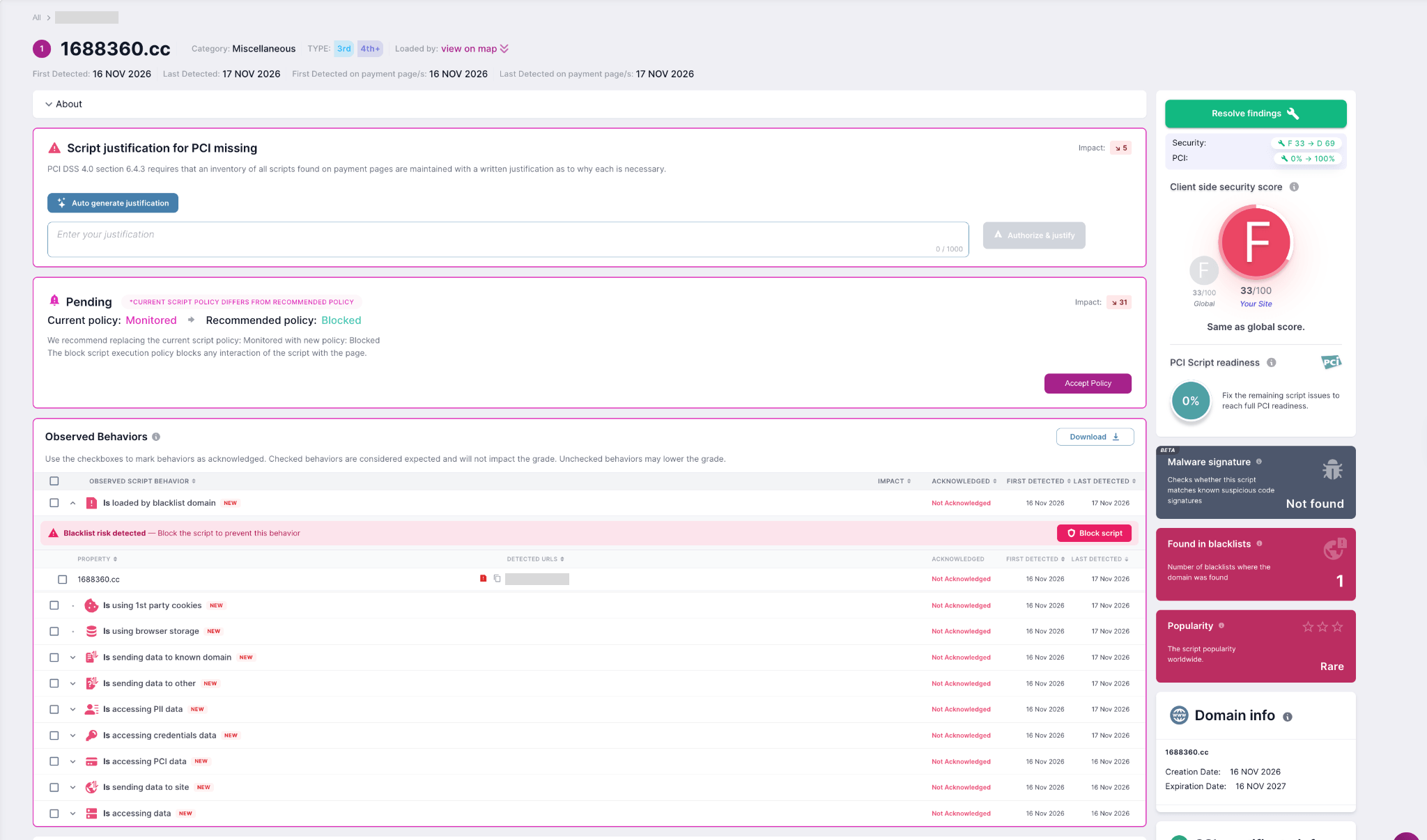
At 15:00:50 UTC on November 16, Source Defense monitoring recorded activity on a website: the page loaded an Optimizely script, which then loaded 1688360[.]cc/track.js. The platform identified the activity and alerted the site owners within minutes.
The alert flagged 1688360[.]cc as a blacklisted domain and listed behaviors including use of first-party cookies and browser storage, sending data to known and other domains, and access to PII, credentials, PCI, and other data. Source Defense emailed the site owners recommending that they block the script, and they did.
Key takeaways
Optimizely was trusted by the affected sites. When it served compromised code, browsers treated it as coming from an approved source. CSP helps control which sources can load, but it cannot assess whether code from a trusted source is behaving maliciously.
CSP could block some parts of this attack if strictly configured, but it would not reliably stop every variant. In one sample, when the separate malicious script could not load, the Optimizely-served file attempted to run an embedded copy. To the browser, that code still came from the trusted Optimizely script, so a CSP allowing Optimizely could permit the fallback to run. CSP can restrict sources and execution methods, but it cannot determine whether code inside an allowed script is malicious or limit its access to specific data.
A trusted script can put every part of a website at risk. Detection helps teams see suspicious activity; runtime protection can restrict a script’s behavior while it runs. Website-wide Protect applies those controls across the customer journey, including pages where fake forms, redirects, or other harmful changes can begin. Protecting checkout alone leaves the rest of the site exposed. Website-wide Protect helps stop malicious behavior wherever it appears.
