


Magecart command-and-control hidden in Cloudflare DNS-over-HTTPS traffic

Attackers discovered a clever way to hide a classic Magecart payment card skimmer inside what looks like completely normal web browsing by turning Google Tag Manager and encrypted DNS into a remote command system.
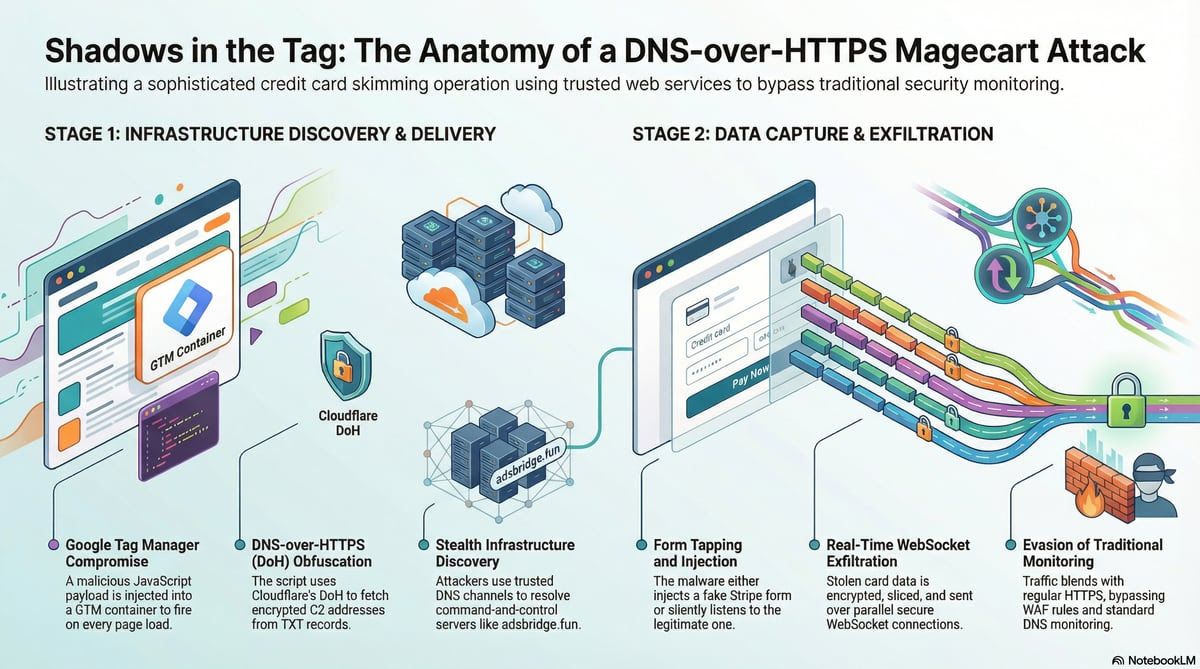
A compromised GTM container quietly loads hidden JavaScript on e-commerce sites, which uses DNS-over-HTTPS (DoH) via Cloudflare to look up a DNS TXT record that tells it where to connect next. Because attackers can update that record at any time to point to new servers, the skimmer automatically evades domain blacklists and keeps running without any changes to the GTM code.
With that attack infrastructure in place, the framework either injects a pixel-perfect fake Stripe payment form or silently listens to the real one, capturing card details as shoppers pay and sending that data out in real time over encrypted WebSocket connections to a separate server.
Because everything runs inside the shopper’s browser and relies on trusted services and brands, traditional DNS monitoring, WAF rules, and server-side logging rarely see anything suspicious until the stolen cards start showing up in fraud reports.
Attack details
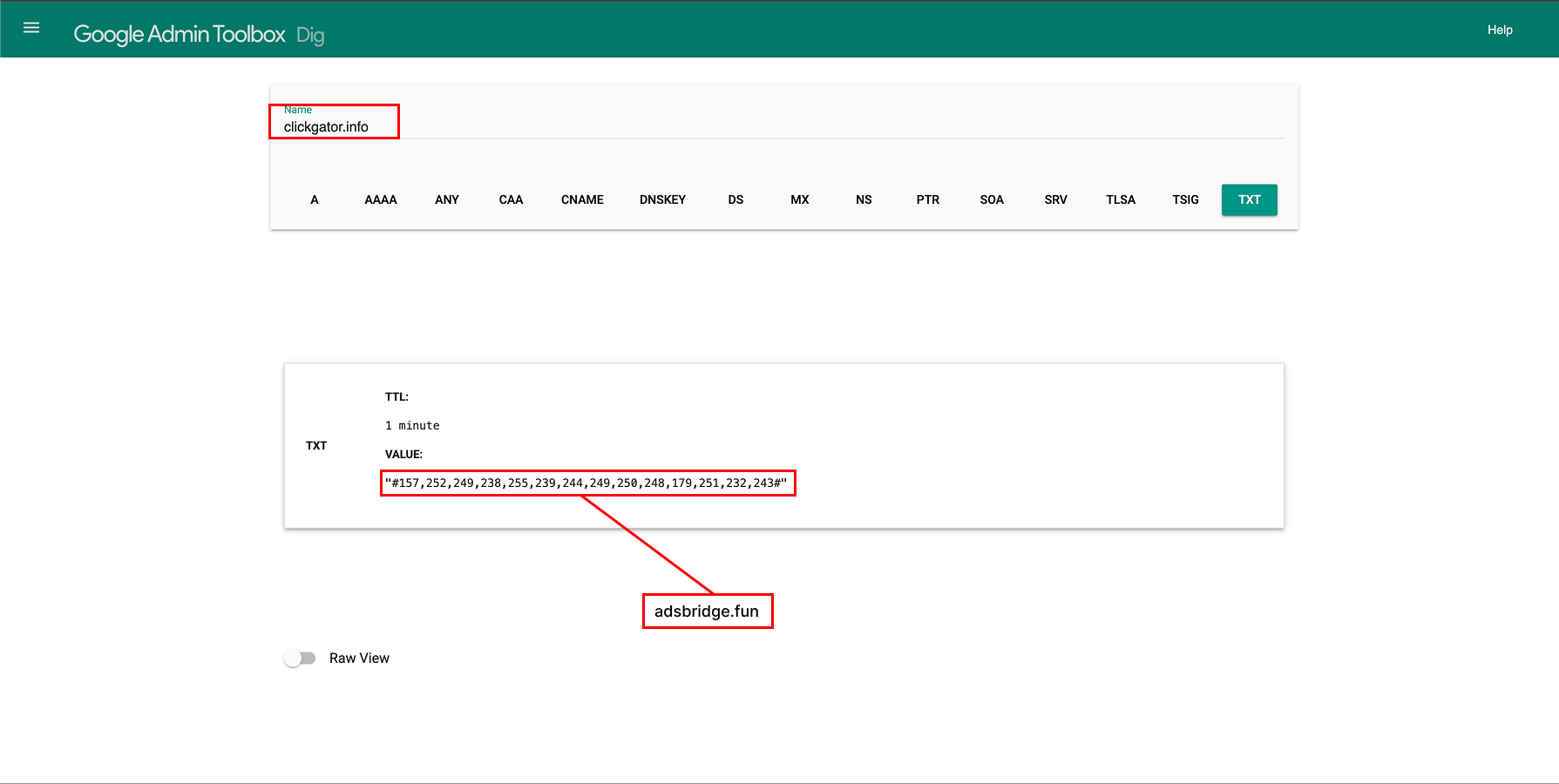
The campaign begins when attackers gain access to a Google Tag Manager container and add a malicious tag that fires on every page load, delivering a heavily scrambled JavaScript payload. That code decrypts itself in stages and runs “infrastructure discovery” logic that first checks browser storage for a cached command-and-control (C2) address and, if none is found, makes a DNS-over-HTTPS request through Cloudflare to fetch a TXT record for clickgator[.]info.
Instead of hard-coding a C2 hostname directly into the GTM code, the attackers use this TXT record as a dynamic indirection layer: today it returns an encrypted WebSocket address that decrypts to a primary C2 server at adsbridge[.]fun (as shown below), but if that domain is ever blocked or added to a blacklist, they can simply update the TXT value to point to a new domain without changing a single line in the site’s tag container.
On checkout pages, this framework either hides the real Stripe payment iframe and injects an almost identical fake form, or leaves the legitimate form in place and silently taps into it, in both cases recording the card number, expiry date, and CVV as the shopper types.
When the victim submits payment, the malware opens multiple parallel WebSocket connections to clickopath[.]info, encrypts and slices the stolen data, and sends it out in segments while keeping long-lived connections to the C2 infrastructure so attackers can push new code, coordinate across all infected sites, and expand beyond payment data whenever they choose.
How Source Defense protects you
Source Defense is designed to stop exactly this kind of first party and third-party, browser-based attack by controlling what scripts delivered through platforms like Google Tag Manager are allowed to do once they reach the page.
In this scenario, Source Defense’s behavior-based controls would apply policies to the scripts loaded and continuously analyze its behavior, blocking attempts to access payment fields (PCI data) or any interaction with scripts opening WebSockets to unknown or blacklisted domains.
Even if attackers rotate domains or hide their C2 lookup inside DNS-over-HTTPS, the solution focuses on the behaviors that matter: DOM manipulation around payment forms, including attempts to hide or replace the legitimate Stripe iframe, and efforts to transfer sensitive data out of the browser, allowing organizations to protect cardholder data at the point of input and meet PCI DSS 4.0.1 expectations for client-side script control.
How Source Defense alerts you
When a campaign like this activates, Source Defense generates clear, behavior-mapped alerts whether you are running in monitor or block mode and whether the offending script originated from a first-party tag or a third-party integration. Security teams would see alerts such as:
- “Accessing PCI data” when the injected framework reads cardholder fields,
- “Accessing PCI data” for personally identifying information,
- “Transferring data” and “Sending data to a blacklisted domain” when it attempts to push encrypted payloads over WebSocket to adsbridge.* or clickopath[.]info
- “Executing risky actions” when it relies on dynamic Function constructors or similar techniques to unpack additional code.
These alerts surface in the in-product notification bell, roll up into dashboard summaries, and appear in widgets such as “Found in blacklists” and “Script behaviors,” giving analysts a fast path from high-level signal to specific offending script.
Based on configuration, the same alerts can also be forwarded via email or webhook into SIEM, SOAR, or ticketing systems so your existing workflows can triage and respond without waiting for manual log review.
Key takeaways
This Magecart campaign shows why client-side security is now essential: attackers are weaponizing trusted tools like tag managers, encrypted DNS, and payment providers’ own branding to quietly harvest cards in the browser, well beyond the reach of traditional WAF rules, CSP allowlists, SRI hashes, or server-side logs alone. Network controls cannot reliably see DNS-over-HTTPS inside HTTPS, integrity checks struggle when third-party containers change frequently, and server telemetry never sees data that is skimmed and exfiltrated before it reaches the backend.
This underlines the need for continuous, behavior-based monitoring and control of every script on payment pages to prevent eSkimming and to satisfy PCI DSS 4.0.1 requirements around script inventory, authorization, and change detection.
It is also clear proof point that protecting the client side is not optional anymore; it is the only practical way to stop modern Magecart operations that blend into normal browser traffic while putting revenue, brand reputation, and compliance at risk.
 Previous