
SAME PLAYBOOK, BIGGER STAGE: A GLOBAL SKIMMING CAMPAIGN ADAPTS TO ANY CHECKOUT
Attackers are scaling up a tactic we highlighted last week in “A Global Skimming Campaign, Customized Site by Site,” but this version is broader, more adaptable, and built to work across many more checkout environments. Instead of relying on a single skimming method, the malware studies how each site handles payments and then chooses the most effective way to steal card and billing data. On some sites it quietly captures information as shoppers type. On others, it hides trusted payment fields behind a convincing fake experience, making the theft hard for both customers and merchants to spot.
The most striking part of this campaign is its flexibility: the malware first identifies how a site handles payments, then chooses the best way to steal the data. This campaign targets more than 100 ecommerce sites worldwide and uses a large infrastructure of lookalike domains, localized fake payment experiences, and modular skimming logic that changes behavior depending on how each merchant processes payments.
On sites with ordinary checkout fields, it quietly captures data as the customer types. On sites that rely on trusted hosted payment frames, it hides the legitimate payment experience and swaps in a convincing fake, allowing attackers to collect card and billing details before the real transaction continues.
Traditional defenses can miss this because the attack unfolds in the browser, blends into normal page behavior, and is designed to stay out of sight when site administrators are present.
Attack details
This is a modular Magecart operation with a broad footprint and infrastructure built for scale. A small, heavily obfuscated loader is first injected into the page and reaches out to attacker-controlled domains, often using typosquatted names that resemble analytics, CDN, captcha, or marketing services.
That initial stage fetches a decryption value used to unlock the next payload, then checks the page environment for signs of an administrator session, such as a visible WordPress admin bar, and aborts if the site owner appears to be online.
From there, the script fingerprints the checkout to decide which attack path will produce the highest yield with the least friction. If payment fields are embedded directly in the merchant page, it switches to silent skimming by attaching listeners to live inputs and harvesting data as the shopper types. If the merchant uses hosted fields from a payment service provider, the attack changes shape: it finds the legitimate iframe, hides it, and injects a visually matching replacement hosted on the merchant’s own origin so it can bypass the isolation that normally protects PSP fields.
The fake form is localized into more than a dozen languages and styled to resemble the expected payment experience, including dynamic branding for supported card networks such as Visa, Visa Electron, Mastercard, American Express, Discover, JCB, Diners Club, and UnionPay. The campaign contains dedicated logic for several payment ecosystems, including Stripe, Square, Braintree, PayPal, Mollie, Razorpay, QuickPay, and Authorize.net, which helps explain its global reach across different merchant stacks.
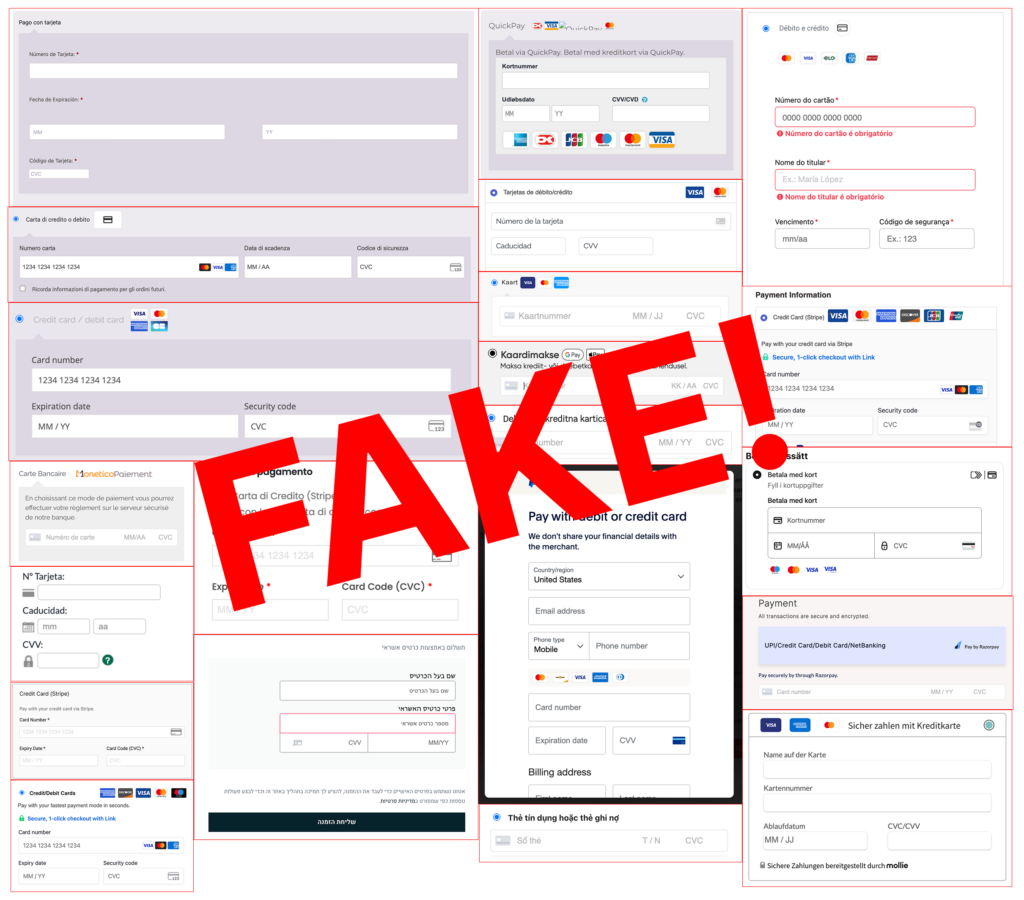
When the shopper submits the order, the script collects billing details and full card data, encrypts the package with a simple custom routine built around the value “777,” encodes it, and sends it by POST to attacker drop-zones on malicious domains.
In many cases it then displays a fake card error so the user re-enters the information, after which the skimmer backs off and lets the second attempt proceed to the legitimate processor, leaving the theft largely invisible to both the customer and the merchan
How Source Defense protects you
Source Defense is built for exactly this class of browser-side attack because it focuses on what scripts do on the payment page, not just where they came from. In a campaign like this, Source Defense would block the malicious script from executing because it is loaded from a blacklisted domain, preventing it from injecting fake checkout overlays, imitating trusted payment flows, or accessing sensitive payment fields in the browser. By extending protection to the client side, Source Defense helps merchants detect and block unauthorized scripts before data exfiltration, secure payment pages where traditional controls have limited visibility, and support PCI DSS 4.0.1 requirements 6.4.3 and 11.6.1 with continuous monitoring of script activity and checkout-page changes.
How Source Defense alerts you
When this kind of attack appears, Source Defense would generate the following alerts based on the behaviors observed in the browser:
- Loaded from a blacklisted domain
- Sending data to a blacklisted domain
- Accessing PCI data
- Accessing PII data
- Transferring data
These alerts surface in the bell notification center and dashboard summaries, with blacklist-related findings visible in the “Found in blacklists” widget and script activity visible in the “Script behaviors” widget where relevant.
Teams can also route alerts by email and webhook into their existing workflows and security platforms based on configuration.
Key takeaways
This campaign shows why client-side security has become essential for o7nline payment pages. The attackers do not rely on a single skimmer or a single payment flow; they study the browser environment, adapt to the merchant’s architecture, and steal data before server-side controls or downstream fraud checks ever have a chance to respond. That makes static defenses and server-focused visibility, including CSP, SRI, WAFs, and server logs alone, too limited for attacks that hide inside live checkout behavior and abuse trusted browser-side components. The practical lesson is straightforward: protecting ecommerce now requires visibility and control at the point where customers actually enter data, because that is where adaptive skimmers like this campaign win or lose.